RemoteCircle connects you securely to your customers’ PCs – over the internet or
directly on the network. And if you like, it creates a complete session report
as a PDF along the way: what was done, for how long, with notes and screenshots.
TLS-encrypted
Hosted in Germany
Multi-monitor & multi-viewer
Try it live
See the Console in action.
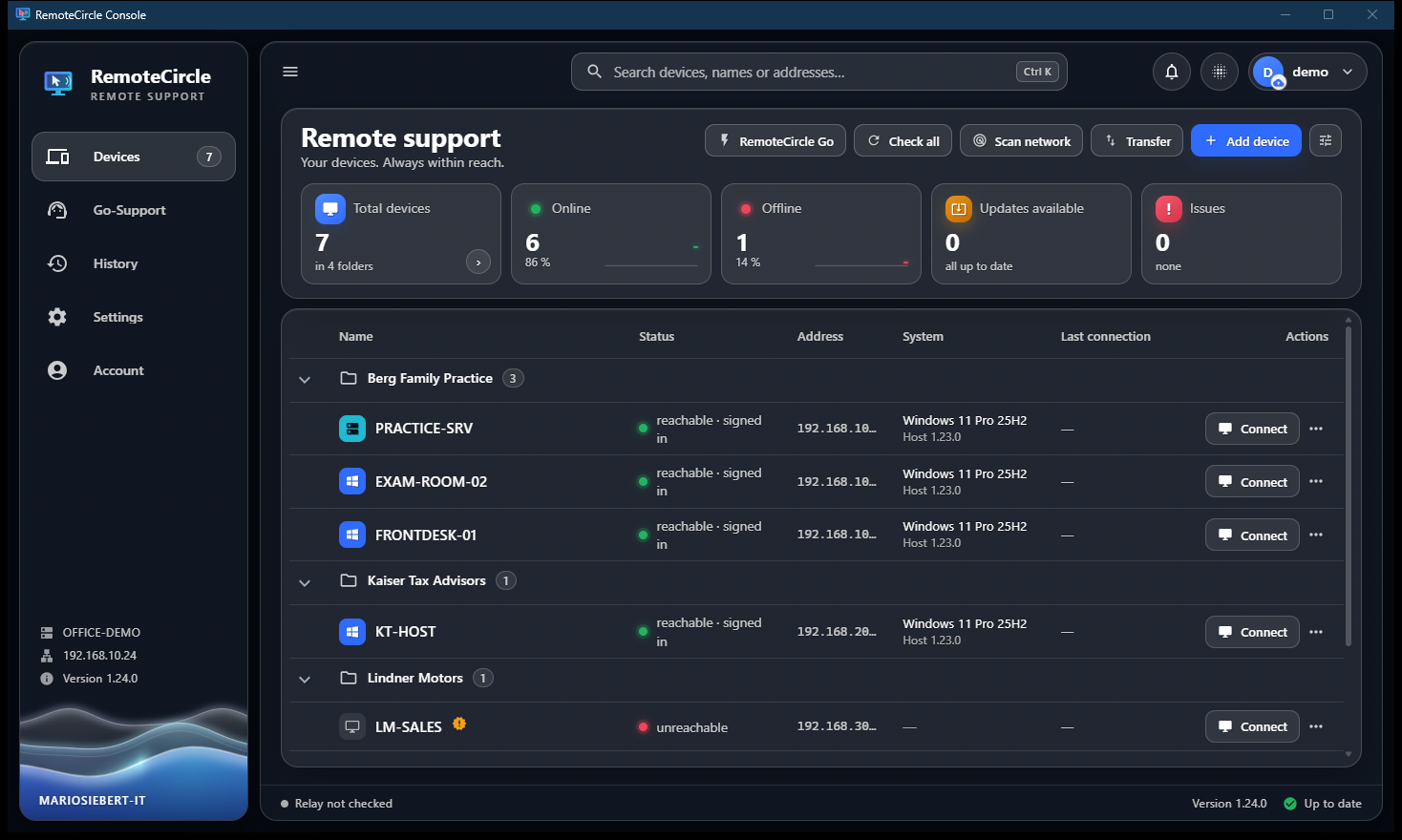
The demo starts in the device list. Click “Connect” next to any device — the demo PC
connects, and you’ll see remote support with the session report, file transfer in both directions,
Ctrl+Alt+Del, blank screen and more. All right in your browser, no installation needed.
Open in a new tab
Full width in a separate tab — the demo starts in the device list there, too.
Simplified demonstration with sample data — the real Console works TLS-encrypted over the internet or LAN.
Features
Everything professional remote support needs.
Built from the day-to-day work of an IT service provider – for everyday use at customer sites, in medical practices and offices.
Internet & LAN
The relay server lets you reach any PC worldwide – no port forwarding required. On your own network, you connect directly.
RemoteCircle Go
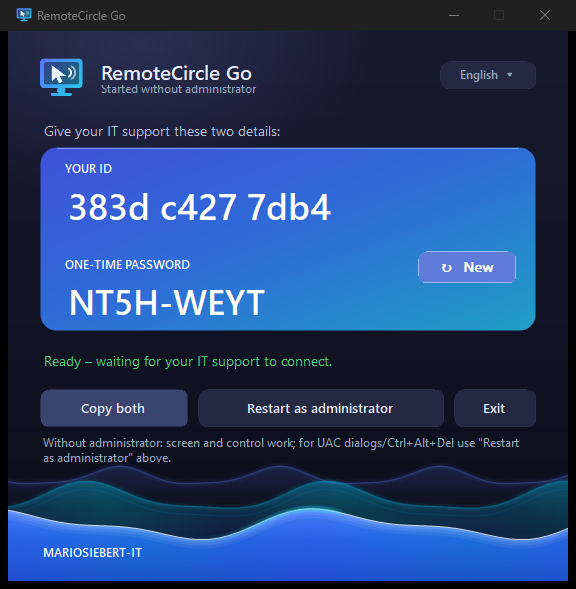
One file, no setup: your customer starts the EXE and reads you the ID and one-time password – and you’re in.
Multi-monitor & multi-viewer
Switch between screens – and when needed, several technicians can view the same PC at the same time.
Ctrl+Alt+Del & lock
Sign-in screen, UAC, password changes – even over the internet. When you’re done, lock the PC with a single click.
Files & clipboard
Transfer files straight to the remote PC and copy text in both directions – no detour via email.
Privacy at a click
Blank the customer’s screen and lock input – e.g. while you enter credentials.
Account with E2E sync
Your device list and settings on all your PCs – end-to-end encrypted; the server only ever sees ciphertext.
Remote updates
If a PC is running an older Host version, the list shows an update notice – one click, and the Host updates itself. The Console keeps itself up to date.
Everything at a glance
For every PC, the device list instantly shows the operating system in plain language – such as “Windows 11 Pro 25H2” or “Server 2022” – along with the Host version and online status.
Account recovery
Forgot your password? Your recovery code gets you back into your encrypted device list – without us ever seeing your data.
Groups & customers
Organize devices into groups by customer or location – and export or import entire groups between accounts.
Free to use
For personal use and small businesses that get by with one remote session at a time, RemoteCircle is free forever. More simultaneous remote support channels are available on request.
The session report
Every session. In black and white.
What other tools forget, RemoteCircle puts at its core: at the push of a button,
every remote session gets a professional PDF report – your proof for the
customer and your basis for billing.
Logged automaticallyConnection, duration, technician, file transfers, Ctrl+Alt+Del – every event with a timestamp.
Notes & screenshotsRecord what you did during the session – screenshots go straight into the document.
PDF with your logoCompany name, header line and logo are fully customizable – the report bears your signature, not ours.
Save or send by emailSave automatically to your documentation folder – or email it straight to the customer or your ticketing system.
Design
MARIOSIEBERT-ITSession report
Aug 27, 2026 14:02 – 14:44
Windows 11 Pro 25H2192.168.1.24Host 0.12.82 screensvia relay
FRONT-DESK
Max Miller
42 min
Connection established
Via relay · consent given on the PC
Note
Checked Windows updates, reinstalled the printer driver.
Screenshot
Print queue after cleanup
File
hp-m404-driver.exe transferred to the remote PC
Session ended
PC locked · report saved
Created automatically with RemoteCirclePage 1 of 1
Fully customizable
Everything that belongs in the report – and nothing you don’t want.
Every detail can be shown or hidden field by field. You decide how detailed your record gets – from a brief receipt to complete documentation.
Automatic eventsConnection, duration, Ctrl+Alt+Del, blank screen & lock input, clipboard, file transfer, lock & disconnect – each with a timestamp.
Remote PC in plain languageComputer name, operating system (e.g. “Windows 11 Pro 25H2”), IP address, Host version, number of screens – each field can be turned on individually.
Total durationHow long you were actually on the machine – to the second, from connection to disconnect.
NotesFree text during the session: what was checked, what was changed – it appears in the right place in the timeline.
Embedded screenshotsCapture the current screen with a caption – it’s embedded right in the PDF, compact and clear.
Technician nameWho carried out the remote session – free text, independent of the Windows user.
Your brandingCompany name, header line, your own logo and the PDF’s accent color – the report bears your signature, not ours.
Opt-in or automaticEither only at the push of a button – or recorded quietly in the background with every connection.
Save wherever you likeSaved automatically to your documentation folder – “Open folder” takes you straight there after saving.
Send by emailStraight to the customer or your ticketing system via SMTP – sender and default recipient fully configurable.
Retroactive startEven if you only open the report midway through the session, the duration is counted correctly from the moment the connection was made.
PDF – easy to share & archiveA clean PDF anyone can open – as proof, for billing or for the customer file.
How it works
Connected to your customer in three steps.
Deploy the Host
On managed PCs, the RemoteCircle Host runs as a background service. For ad-hoc help, RemoteCircle Go is all you need – one file, no setup, no admin rights required.
Connect securely
The Console shows all devices with their live status. One click, the access password – and you’re connected, TLS-encrypted, optionally with the customer’s consent.
Work & document
Full control over mouse, keyboard and monitors. The session report builds itself along the way – ending up as a PDF in your folder or right in your inbox.
Three apps, one solution
Console, Host and Go — for Windows and macOS.
Each app has its role: the Console for control, the Host for permanently managed PCs,
and RemoteCircle Go for ad-hoc help with no installation at all. All three run on Windows
and macOS — in the same clean glass design.
Console
Your control center: all customer PCs with live status, one click to connect, multi-monitor, file transfer — and the session report built in.
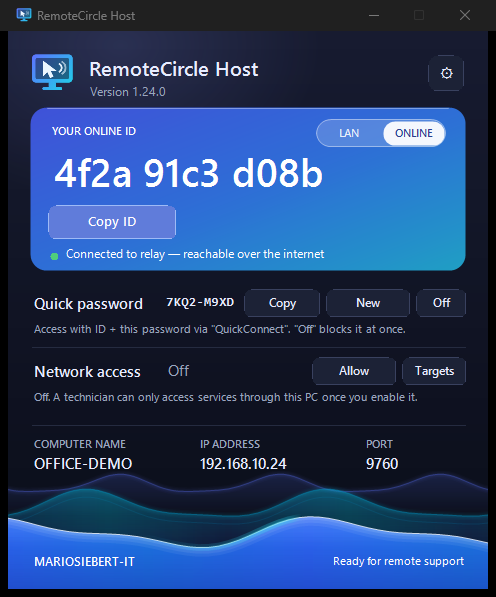
The quiet service on managed PCs: runs in the background, is always reachable via the relay and can be updated remotely. A large ID that’s easy to read out, LAN/online with one click.
Ad-hoc help without installation: a single app, launched with a double-click. The customer reads out the ID and one-time password — after the session, everything is gone. With one-click elevation for admin tasks.
For ad-hoc help on Windows, there’s nothing to install – just download RemoteCircle Go. The Host for permanently managed PCs and the Console for your own workstation are available right here, too. All three apps are also available for macOS. Further down, you’ll find the relay server for self-hosting and an info flyer as a PDF (German).
Windows Available
RemoteCircle Go
Ready to go · no installation
A single EXE – no setup, no admin rights. Your customer double-clicks it and reads you the ID and one-time password shown, and you connect. After the session, everything is gone.
Windows shows a SmartScreen notice for unfamiliar programs – click “More info” → “Run anyway”. Requires the Microsoft Edge WebView2 Runtime (already included in Windows 11); if it’s missing, setup will tell you and offer a download link. For Windows 10/11 (64-bit) · approx. 114 MB. No installation needed: portable version (ZIP) – unpack, start, sign in.
Host
The service on managed PCs
Installed permanently, runs in the background as a Windows service and is always reachable – can be updated remotely from the Console.
Installer package (.pkg); installation requires administrator rights. On first launch, you may need to allow it under “Privacy & Security”. For macOS · approx. 51 MB.
Linux In the works
RemoteCircle Go Soon
No installation · for Linux
Ad-hoc help on the Linux desktop – launch it, read out the ID and one-time password, done.
Coming soon
In development – X11 first (Debian, Ubuntu, Fedora, SUSE …).
Console Soon
The control app
Device list, remote support view and session report – controlled right from your Linux PC.
Coming soon
In development – one build for all distributions.
Host Soon
The service on managed Linux PCs
Support Linux desktops permanently as a background service, always reachable via the Console.
Coming soon
In development – X11 first.
Your own server (relay) Self-host
RemoteCircle on your own server
Run the relay server for internet access yourself – on Windows as a service via the installer, or on Linux with Docker. No third-party cloud; the entire data path stays with you.
Free forever for personal use and small businesses with one remote session at a time. More simultaneous remote support channels – on request.
Pricing
Free for everyday use. More channels on request.
For personal use and small businesses that get by with one remote session at a time, RemoteCircle is free forever – with all features. If you need several remote sessions at once, simply unlock additional channels on request.
Free
€0forever, no contract term
For personal use and small businesses that get by with one remote session at a time.
The free plan is permanent – no contract term, no hidden costs. We’ll tailor additional remote support channels to your needs.
Security
Your customers trust you. We make sure it stays that way.
TLS all the way
Every connection is encrypted in transit – with certificate pinning on the LAN and trusted certificates online.
The password stays on the PC
The remote PC checks the access password itself – as a hardened hash. Optionally, the customer has to approve every session.
End-to-end for your account
Your device list and settings sync with AES-256 encryption. The key never leaves your PC.
Servers in Germany
The relay server runs in a German data center – operated by us, not by a big corporation.
What's new
Constantly evolving.
Every change in the new versions at a glance – newest first.
1.26.0Current
Folder transfer, faster picture
Transfer whole folders, subfolders included, between your PC and your customer's PC – in both directions, right in the file manager.
Faster screen transfer on Windows: the screen is captured through Windows desktop duplication – around ten times faster than before, falling back to the previous method automatically.
The security keys of your online PCs are synced through your account – a second PC knows them right away.
Host: the language only changes when you click “Apply” instead of asking for administrator rights on every selection. Dates in the Host window appear in your language.
The wave in the file manager now spans the full window width.
1.25.2
Nothing gets lost when switching accounts
If device changes were not uploaded before an account switch, the Account page offers to restore them.
Dates in the Console, the history and the PDF report follow the selected language.
1.25.1
Passwords encrypted on the PC
On Windows, access passwords, the SMTP password and your account key are stored encrypted in your user profile – only your Windows user can open them.
Starting the Console a second time brings the running window to the front instead of opening another one.
Settings changed in a remote session window now also reach the main window.
1.25.0
Stronger security over the internet
The access password is sealed on your PC and only opened again on the target PC – the relay server no longer sees it.
Every PC is bound to its device ID: nobody can pose as a PC that is switched off.
Creating new accounts is protected against mass abuse.
The device list checks the status of all online PCs in a single request – faster and with less load.
Show older versionsHide older versions
1.24.2
Hardened installation
The Host's data folder is now accessible to the system and administrators only.
The Windows relay no longer keeps its access key in the service command line.
1.24.1
Installers in three languages
Console, Host and relay installers are available in German, English and Polish.
Messages from the relay server appear in the Console's language; the relay manager is translated.
New info flyer in three languages.
1.24.0
English and Polish
Console, Host and RemoteCircle Go fully in German, English and Polish – switchable in the settings.
This website is available in all three languages as well.
1.23.0
Reliable start-up, screen detail in the report
The Host service starts reliably after a reboot – with an additional start-up safeguard.
Session report: drag a frame to capture just part of the screen instead of the whole screen.
The relay settings are locked against accidental changes.
Relay manager and license tool in the design of the product family.
1.22
Connection history
New “History” page: every remote session with duration, operator and report – on all your PCs through your account, exportable as CSV.
More reliable network access, also straight from the device list.
1.21
File manager and session window
“RemoteCircle Files”: a two-pane file manager to copy, move, rename and delete.
On the customer's PC: a session window in the bottom right and a notice bar that slides away when the mouse touches it.
See who else is working on a PC – and end their connection.
Network access without a running remote session, with its own notice on the target PC.
1.20
Network access and system info
Network access: reach services on the customer's PC such as Remote Desktop, a database or a web interface via 127.0.0.1 – no VPN, no port forwarding.
System info per PC: hardware, load, drives and signed-in users.
Personalised RemoteCircle Go with your own logo, signed straight from the Console.
New design for Host and Go with the moving wave; a consistent remote session window.
1.19
Go-Support and messages
Go-Support: customers request help with their personal RemoteCircle Go, and you connect with one click.
Messages to the user that stay on screen after the session – replies arrive automatically.
Servers can be marked and appear at the top of their folder.
First digitally signed version.
The macOS versions follow the Windows releases shortly after.
FAQ
Frequently asked questions
The key answers about RemoteCircle – from security to pricing.
What is RemoteCircle?
RemoteCircle is remote support software for Windows and macOS: you connect securely to your customers’ PCs – over the internet or on the local network – and, if you like, every session is automatically documented as a PDF report.
Does anything need to be installed on the customer’s side?
Not necessarily. For ad-hoc help, the customer starts RemoteCircle Go with a double-click – no installation, no admin rights. For PCs you look after permanently, there’s the Host, which runs as a background service and is always reachable.
Does remote support work over the internet without port forwarding?
Yes. Via the relay server, both the remote PC and your Console connect outbound – no port forwarding is needed at the customer’s site, and it works behind any firewall and router. On the local network, you can also connect directly without the relay.
Is the connection secure and encrypted?
Yes. Sessions are TLS-encrypted, and on the LAN they also use certificate pinning. The remote PC checks the access password itself, as a hardened hash. Your device list and settings are end-to-end encrypted – the server never sees them.
Where are the servers – and what about data privacy?
The relay server runs in a German data center, operated by us. If you prefer, you can even host it entirely yourself – then the entire data path stays with you. No third-party cloud.
How much does RemoteCircle cost?
For personal use and small businesses that get by with one remote session at a time, RemoteCircle is free forever (up to 10 devices). If you need several remote sessions at once, you can unlock additional channels and unlimited devices on request – just drop us a quick note.
Which operating systems are supported?
Windows 10/11 and Windows Server, plus macOS. Console, Host and RemoteCircle Go are available for both platforms, so you can support mixed environments from a single interface.
What is the session report?
If you like, a complete record is created automatically during every remote session: which PC, how long, which steps – with notes and screenshots. At the end, you get a finished PDF in your folder or by email, with your logo and your colors. Ideal for billing your customers.
Can I run the relay server myself?
Yes. You can run the relay on your own server – on Windows with an installer, or on Linux with Docker. You’ll find details and downloads on the “Self-host the relay” page.
Contact
Interested in RemoteCircle?
For personal use and small businesses with one remote session at a time, RemoteCircle is free forever.
If you need several simultaneous remote support channels, drop us a quick note about how you plan to use it –
you’ll get a personal reply with all the details shortly.